Learn how to set up and customize Salesforce Surveys. Candybox, top Salesforce consultants for SaaS, shows how to use the survey tool for smarter feedback loops.

Salesforce Surveys is a powerful native tool that lets you gather actionable feedback from customers, partners, and internal teams, all within the Salesforce ecosystem. Despite its capabilities, setting up the Salesforce survey tool isn’t always intuitive. In this guide, Candybox - trusted by leading SaaS companies for Salesforce and RevOps consulting - walks you through how to implement and optimize Salesforce Surveys effectively.
Salesforce Surveys allow organizations to design, distribute, and analyze surveys directly in Salesforce. You can create branded experiences, customize question types, and integrate response data with reports and dashboards all without leaving your CRM.
As a top Salesforce consultant for SaaS companies, we've used Salesforce’s built-in survey tool to help clients automate feedback loops, monitor customer satisfaction (CSAT), and drive revenue operations insights.
Let's now take a look at how we'd approach setting up Salesforce Surveys in our Salesforce instance.
The first step is to enable surveys from the setup menu.
Important note:

To be able to create or send a survey, users need to be assigned one of the following four standard profiles:
Note:
For users with custom profiles that need to be able to create and send surveys, the following object permissions are required:

For users within the company to be able to respond to surveys they would need the following permissions:

For guest users to be able to respond to surveys they would need the following permissions on Guest User Profile of the default community:

Surveys may contain sensitive information which the survey participant may only need to share with the survey owner. In these cases, administrators can configure the survey sharing settings to ensure the creator can see all the responses, but the participant cannot.

Survey Sharing Settings
Now we are ready to build our first survey 🙌


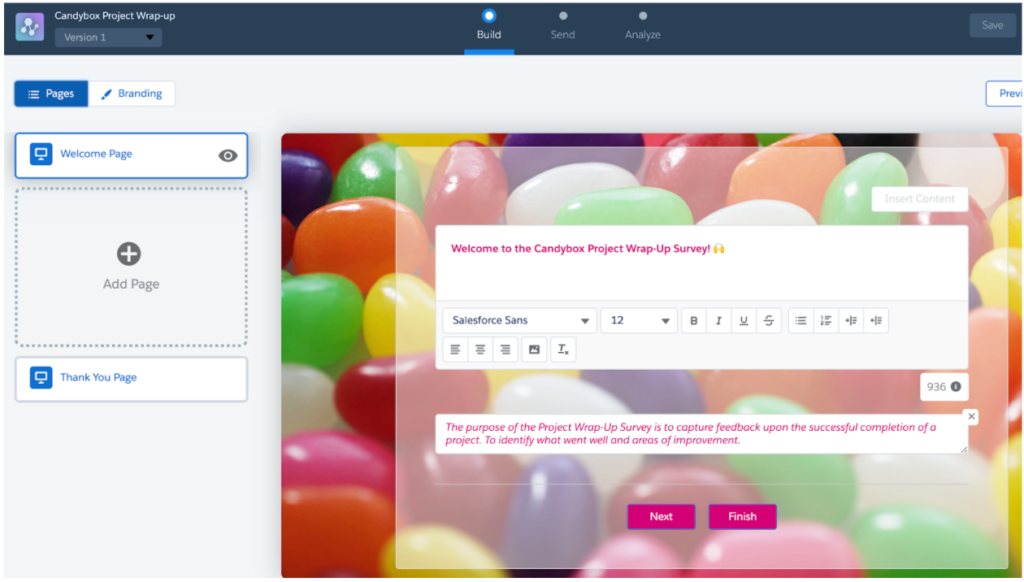

Now we are ready to add the main content of the survey - the questions!


Repeat steps 1-4 until you have added all questions you need. Final Survey pages will look something like this:

Administrators can personalize the participants’ experience by either adding page branching or question logic.
For example in our survey, if the participant scores a 5 for the first then we would like to skip to the 3rd page of the survey.
We can do this by following these steps:
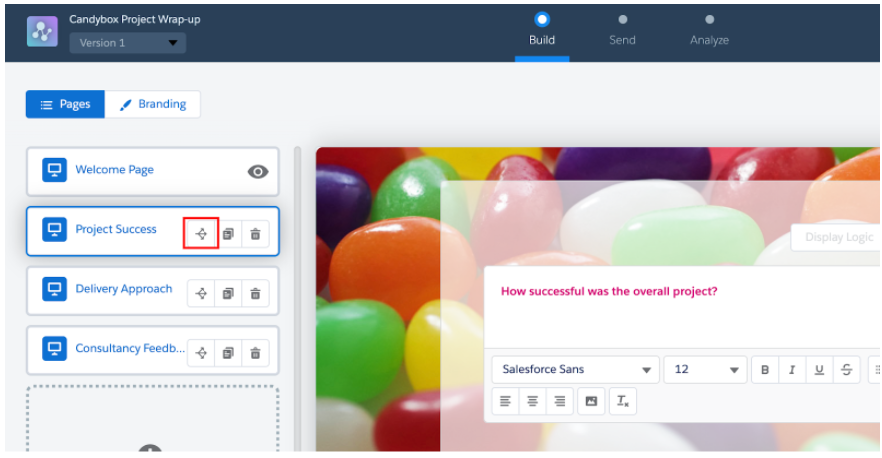


Rules can be added for question logic also. A good example use case would be when a participant selects a score below a certain value, then you might want display a text prompting them for the reason behind the low score. Display logic can be found on the questions on a survey page.
Now that we have added our branching logic we can activate our survey!
We have completed the build of our survey and have finished adding questions and page branching logic. Before we can send out the survey, though, we must first activate it.
The survey can be activated by selecting the Activate button followed by the Got It button.

We have now successfully activated our survey! Now to send it to our participants!
To be able to send out the survey we must go to the Send tab of the survey.
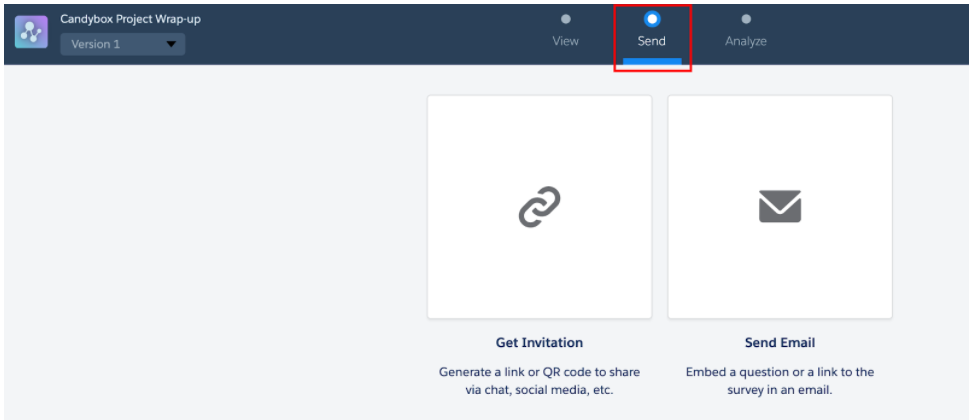
For this scenario, I’ll be sending the participant an email.
Complete the following steps:

We now have sent out a survey to a customer to be completed.
To analyze your Survey Responses you have to go to the Analyze tab. Here you can see responses for all the completed surveys. Survey responses can be exported if needed.

As a leading Salesforce consultancy for SaaS businesses, some ideas you may wish to steal for implementing surveys are:
These workflows turn Salesforce Surveys into a revenue feedback engine rather than just a data collection tool.
In summary, Salesforce Surveys have come a long way since its inception, but now we have a well-rounded feature that should be explored and used for business cases.Whether you;re capturing NPS, CSAT, or product feedback, the Salesforce survey tool offers seamless integration and robust reporting.
Need help implementing surveys tailored to your RevOps model? At Candybox, we've built smart survey automation for dozens of growth-stage SaaS teams and we'd love to help you do the same.
👉 Book a free RevOps consultation with our team to explore how Salesforce Surveys can drive smarter growth.

Candybox Team
RevOps, Salesforce & HubSpot experts
Candybox designs and runs the Salesforce, HubSpot and AI systems behind fast-growing B2B SaaS companies.









Straight answers to what B2B SaaS teams ask us most. Don't see yours? Just ask us.